


What you bring
Provide the workshop goal, proposed format, date, budget and the decision you want Alex to help you make. Ask for a concise PDF proposal.
 Lingo Chats
A clear document can turn a good conversation into a real next step. Ask Lingo to structure your information into a polished PDF you can review and share.
Start with Lingo ↗See a worked example ↓
You have the notes, the audience and a reason to follow up. What you need now is something clear enough to read, useful enough to keep and polished enough to send to the person waiting for it.
Provide the workshop goal, proposed format, date, budget and the decision you want Alex to help you make. Ask for a concise PDF proposal.
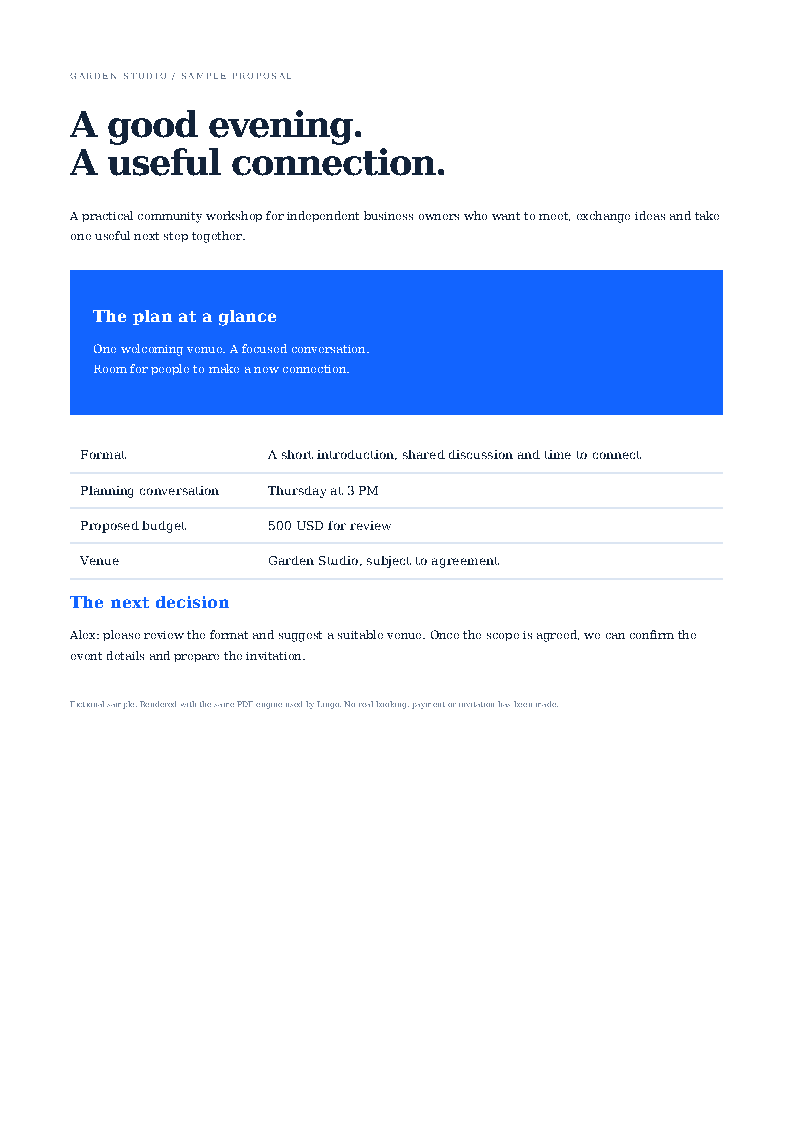
A real PDF can contain a cover, the essentials and a clear next step. This page includes a sample rendered with the same offline PDF engine used by Lingo, so you can open the actual file.
Review the pages, correct the details and ask for the finished PDF to be attached to an email when you are ready.
Useful structure matters more than filling pages. Tell Lingo who will read it and what they need to decide. A proposal, meeting summary or event handout can then be shaped around that purpose.
Independent consultants · Event and workshop organizers · People turning notes into proposals
✓Create a polished PDF from your brief
✓Turn notes into a clear summary
✓Include generated imagery
✓Review document previews
✓Email or share the finished file when asked
Provide the content and intended audience. Connected Gmail or WhatsApp is needed to send through those channels.
Use the service from your Lingo account. For account access and any plan conditions, use the options shown in the app.
Open Lingo ↗A community workshop. A conversation on Thursday at 3 PM. A proposed budget of 500 USD. A venue for Alex to review.
Open the actual sample PDF to inspect the result. Review the details before asking Lingo to share the finished file through a connected channel.
Yes. Ask it to send the generated file as an attachment through your connected Gmail, with a clear recipient.
Provide the content and intended audience. Connected Gmail or WhatsApp is needed to send through those channels.
No. The interface examples use fictional sample data. Generated photographs are illustrative. The downloadable samples are provided so you can inspect the format and result.
Start with one person, one promise or one thing you want to move forward.